 Somuno
Blog › Best-of lists
The best offline AI voice enhancers: clean up speech without uploading it
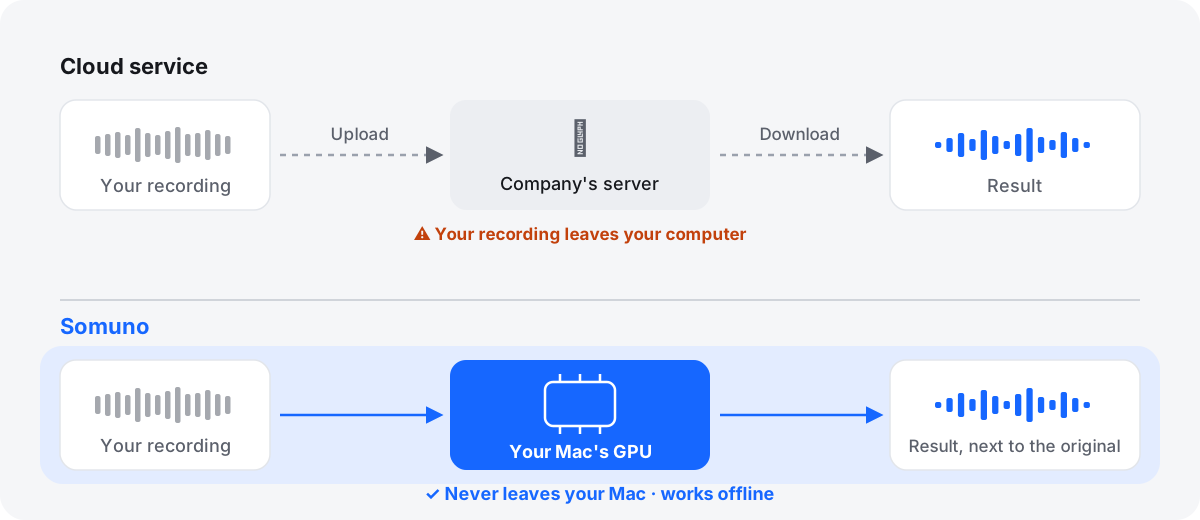
If a recording can't leave your computer – a confidential interview, a client call, a deposition, a patient conversation, anything under NDA – you need a voice enhancer that runs on your own machine. On a Mac, the tools whose makers say plainly that they process locally include Somuno, iZotope Photon, Hush and Accentize dxRevive. Desktop editors and plugins such as iZotope RX, Final Cut Pro, DaVinci Resolve Studio and Antinode Clear also run on your computer, though their makers don't always say so in as many words.
This list covers 10 on-device tools, what each is best for and its limits, plus a quick way to check for yourself that a tool works offline. Popular cloud tools such as Adobe Podcast, Auphonic, Cleanvoice and Descript's Studio Sound aren't on it, because they need your file on their servers or an internet connection.
Somuno is made by the author of this blog. Facts about the other products come from their official pages, checked in November 2026. Prices and features change, so check them before you buy.
Why on-device processing matters
- Confidential sources and interviews. Journalists and researchers often promise that a recording stays with them. Uploading it to a cleanup service, however secure, breaks that promise.
- Legal, medical and NDA work. Depositions, client meetings, patient interviews and embargoed material may not be allowed on outside services at all.
- Slow or no connection. Long WAV files and videos are large. On a slow or metered connection, the upload can take longer than the cleanup, and on a plane a web tool doesn't work at all.
- No accounts, credits or caps. Local tools don't meter you by the minute. You pay once or subscribe, and process as much as your computer can handle.
One caution: local processing helps, but on its own it doesn't make a workflow compliant with privacy laws or contracts. Check your organization's rules too.
How we chose
Every tool here runs on a Mac and processes files on your computer. We included tools only if their official pages say they run locally, or if they are desktop apps or plugins that run inside your own software. Where a maker doesn't state it outright, we say so. Discontinued products such as Goyo and Accentize VoiceGate are left out.
We didn't run blind listening tests, so the order isn't a ranking by sound. We compare what can be checked: what the maker says about processing, platforms, price, limits, video and batch handling.
At a glance
| Tool | Best for | What the maker says | Price (as of November 2026) | Free option |
|---|---|---|---|---|
| Somuno | Private batch cleanup on a Mac | Never uploaded, works offline | US$19.99 one-time | First 60 s of each file |
| iZotope Photon | Separation plus cleanup | “nothing leaves your device” | US$349 (US$259 deal) | 14-day trial |
| Hush | Intel Macs and macOS 12 | “runs locally on your Mac” | US$89.99 one-time | 21-day trial |
| Accentize dxRevive | Restoring damaged dialogue | “100% local processing” | US$99 / US$299 | 7-day trial |
| iZotope RX 12 | Detailed repair | Desktop software; no cloud step described | From US$99 | 10-day trial, no export |
| Antinode Clear | Low-cost plugin | Plugin; not stated | US$69 (US$49 offer) | Limited trial |
| Final Cut Pro | Final Cut Pro editors | In the app; no cloud step described | US$299.99 | 30-day trial |
| DaVinci Resolve Studio | Resolve editors | In the app; no cloud step described | US$295 (US$236 sale) | Not in free Resolve |
| Adobe Premiere | Premiere editors | Current version local; beta V2 is cloud | US$22.99/month | 7-day trial |
| Audacity | Free steady-noise cleanup | Desktop app; OpenVINO AI “100% locally” | Free | Fully free |
10 on-device voice enhancers
1. Somuno
Best for private batch cleanup on a Mac
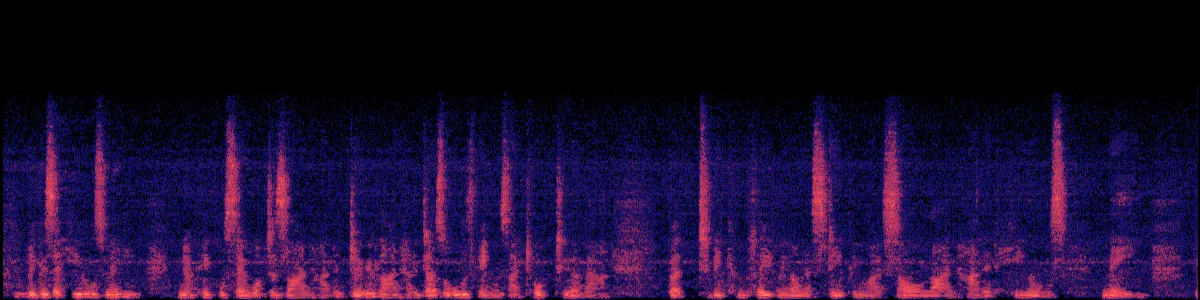
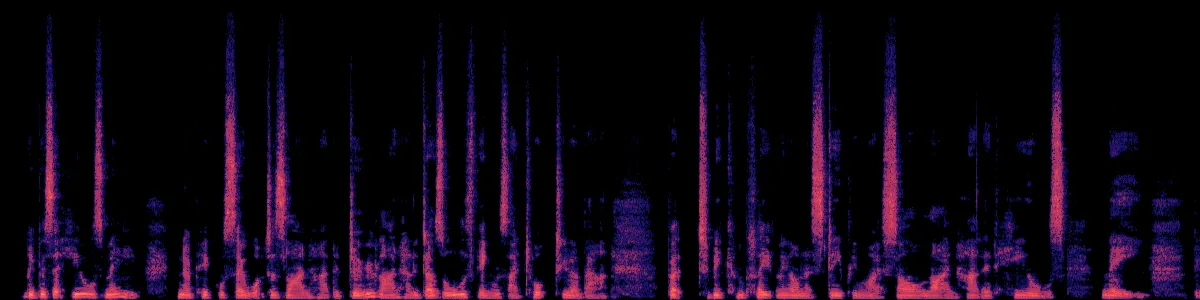
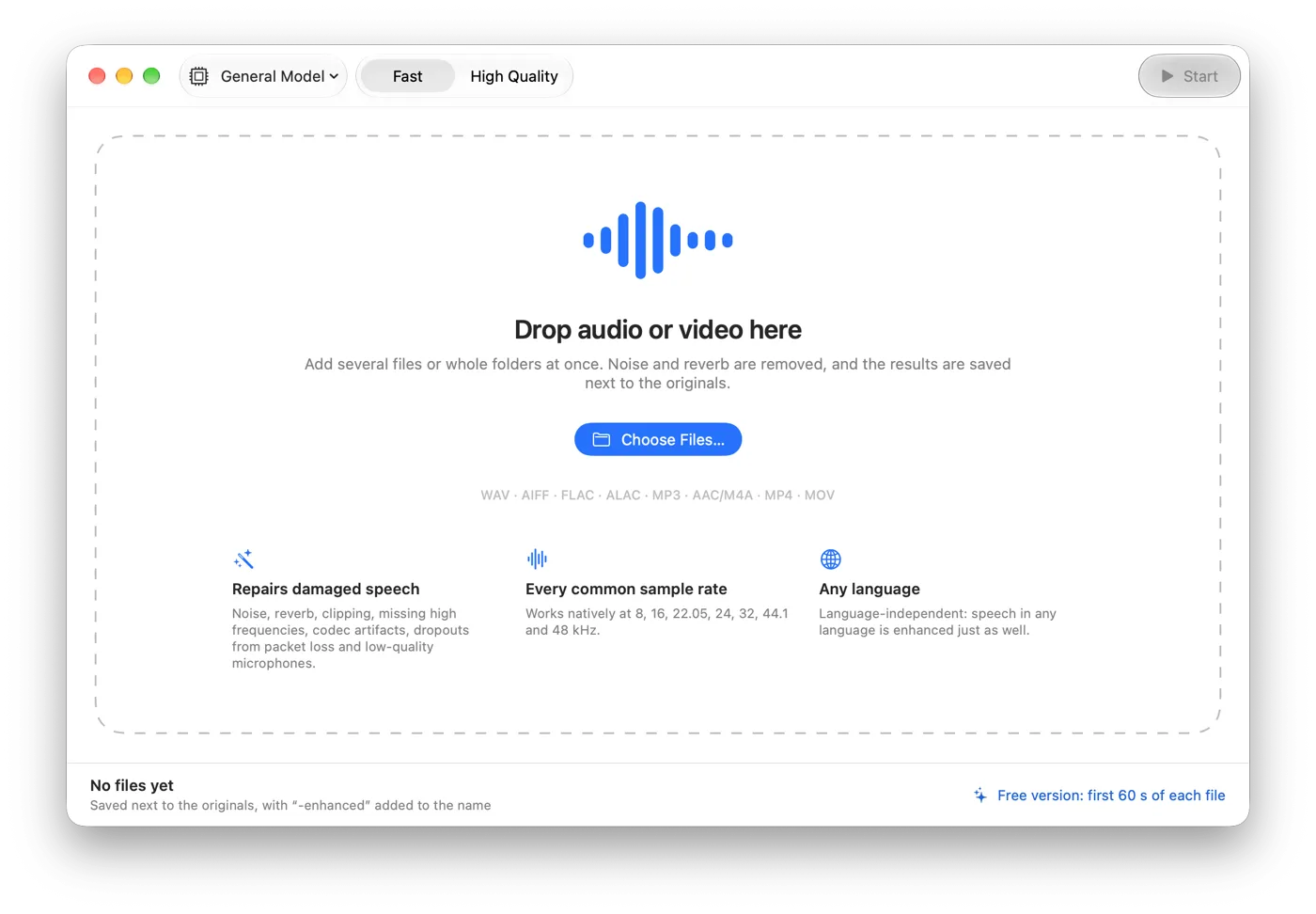
Somuno removes background noise and room reverb from voices in audio and video files, using an AI speech-enhancement model that runs on the Mac's GPU. Recordings are never uploaded – not to the developer, not to anyone – no account is needed, and it works without an internet connection. The same model repairs clipping, missing high frequencies, codec artifacts and dropouts, so it suits phone interviews and Zoom recordings. Whole folders go into a queue, results are saved next to the originals, and for MP4, MOV and M4V videos only the soundtrack is replaced.
It needs Apple silicon and macOS 14, it isn't real-time or a plugin, and it's made for speech, not music. It can't separate two people talking over each other. Somuno is about to launch; listen to the samples first.
Platform: Mac with Apple silicon, macOS 14 or later · Price (as of November 2026): US$19.99 one-time on the website, for up to 3 Macs; an in-app purchase in the Mac App Store version · Processing: local, works offline · Free option: free version that enhances the first 60 seconds of each file
 After Somuno
2. iZotope Photon
Best for local cleanup plus speaker and stem separation
Photon is a standalone app and ARA2 plugin. iZotope says its 12 AI models “all run locally on your GPU”, that “nothing touches the cloud – and nothing leaves your device”, and its page asks: “Working under embargo?” Speech models handle noise, echo, levels and mic tone; Voice Separator splits up to 6 voices; and video goes in and comes back out with the original video stream kept.
Note that its Model Manager needs the internet to download models (iZotope offers an offline installer through support). It needs Apple silicon, and its page doesn't mention batch processing.
Platform: Mac with Apple silicon (macOS 14 or later) and Windows · Price (as of November 2026): US$349 one-time, shown at US$259 in a limited-time deal; or US$19/month or US$119/year · Processing: local, on the GPU · Free option: 14-day trial with no file or export limits
3. Hush
Best for on-device cleanup on Intel Macs and older macOS
Hush says it “runs locally on your Mac, keeping all your audio data private and secure”, and its App Store privacy label reads “Data Not Collected”. It removes broadband noise, reverb and sudden sounds, takes whole batches, and runs on macOS 12 and Intel Macs as well as Apple silicon.
The App Store version dates from October 2023, and Hush doesn't document formats or video support. See Somuno vs Hush.
Platform: Mac, macOS 12 or later, Intel or Apple silicon · Price (as of November 2026): US$89.99 one-time on the US Mac App Store · Processing: local · Free option: 21-day trial
4. Accentize dxRevive
Best for restoring damaged dialogue inside your editor, locally
dxRevive is a plugin that, according to Accentize, works with “100% local processing” and “without sending data to the cloud”. It goes beyond noise and reverb: it restores missing frequencies in band-limited audio, removes codec artifacts from Skype or Zoom recordings and recovers clipped audio. It runs in Pro Tools, Logic Pro, Premiere, Final Cut and DaVinci Resolve.
You need a host app, Accentize says to expect higher CPU usage, and dxRevive Pro needs iLok.
Platform: Mac (native on Apple silicon) and Windows, as a plugin · Price (as of November 2026): dxRevive US$99, dxRevive Pro US$299 · Processing: local · Free option: 7-day trial
5. iZotope RX 12
Best for detailed offline repair
RX is a standalone audio editor plus plugins, with Voice De-noise and De-reverb in every edition and Dialogue Isolate, which works offline or in real time, from Standard up. iZotope's RX pages don't describe any cloud processing; it's desktop software that works on your files where they are.
The cost: Dialogue Isolate starts at US$399, the learning curve is real, and the trial can't export. See Somuno vs iZotope RX.
Platform: Mac (Intel and Apple silicon) and Windows · Price (as of November 2026): Elements US$99, Standard US$399, Advanced US$1,399 one-time; or from US$15/month · Processing: local desktop software · Free option: 10-day trial with export disabled
6. Antinode Clear
Best low-cost plugin for voice, ambience and reverb
Antinode Clear, formerly Supertone Clear, is a real-time plugin with three knobs: voice, ambience and voice reverb. Antinode's page doesn't say where processing happens, but as an AU, VST3 or AAX plugin it runs inside the host app on your computer.
It supports only 44.1, 48 and 96 kHz, the trial outputs noise every 60 seconds, and the product changed owners in September 2026.
Platform: Mac (native on Apple silicon) and Windows, as a plugin · Price (as of November 2026): US$69 one-time, shown at US$49 in a limited-time offer · Processing: inside your host app · Free option: trial that outputs noise every 60 seconds
7. Final Cut Pro Voice Isolation
Best if you already edit video in Final Cut Pro
Voice Isolation is a machine-learning effect inside Final Cut Pro, with an Amount slider. Apple doesn't describe a cloud step for it, and it works on clips in your library.
It's per clip, not a batch tool, Apple doesn't claim reverb removal, and overlapping components “may result in garbled audio”. See Somuno vs Final Cut Pro.
Platform: Mac (and iPad) · Price (as of November 2026): US$299.99 one-time, or Apple Creator Studio at US$12.99/month · Processing: in the app; Apple describes no cloud step · Free option: 30-day Creator Studio trial
8. DaVinci Resolve Studio Voice Isolation
Best for Resolve editors
Resolve Studio's Voice Isolation “uses DaVinci Neural Engine AI” inside the editor, and Blackmagic doesn't mention cloud processing for it. Studio is a one-time purchase.
The free version of Resolve doesn't include it, and Resolve 21 needs macOS 15 and Apple silicon.
Platform: Mac with Apple silicon (macOS 15 or later), Windows, Linux · Price (as of November 2026): US$295 one-time, shown at US$236 in a sale · Processing: on your computer; Blackmagic describes no cloud step · Free option: none for Voice Isolation
9. Enhance Speech in Adobe Premiere
Best if you're already in Adobe Premiere
The Enhance Speech built into Premiere's desktop app is a different thing from the Adobe Podcast website. Adobe staff said in 2023 that it “has been optimized to perform locally on your machine” and that “no internet connection is required”.
Watch the beta: Enhance Speech V2 in Premiere's beta “runs in the cloud as part of Firefly” and uses credits, so check which version you're using before you process confidential audio. It's subscription only.
Platform: Mac and Windows · Price (as of November 2026): US$22.99/month (annual plan, billed monthly) · Processing: local for the current version; the beta V2 runs in the cloud · Free option: 7-day trial
10. Audacity, with or without OpenVINO
Best free offline option
Audacity is a free desktop editor, and its classic Noise Reduction effect handles steady hiss and hum on your computer. For AI noise suppression, Intel's free OpenVINO plugins say they “run 100% locally on your PC… no internet connection necessary”.
The catch: the Mac build of the OpenVINO plugins is a beta that works only with Audacity 3.7.x, not Audacity 4, and an Intel contributor says Mac support was a community contribution Intel's developers can't test. See Somuno vs Audacity.
Platform: Mac, Windows, Linux (OpenVINO on Mac: beta, Audacity 3.7.x only) · Price (as of November 2026): free · Processing: local · Free option: fully free
Other local tools worth knowing
- CrumplePop (Boris FX): nine plugins, including AudioDenoise and EchoRemover, plus Photon. Boris FX says “all audio stays private and processes locally on your machine”. US$369 perpetual, or US$25 a month or US$175 a year, as of November 2026, with a 15-day trial.
- Waves Clarity Vx: a real-time noise removal plugin for DAWs. Waves doesn't say where it processes, but it runs inside your host app.
- Krisp: cleans live calls, not recorded files. Its help center says “all processing happens locally on your device”.
Windows only: NVIDIA Broadcast removes noise and room echo locally on an NVIDIA RTX graphics card and is free for RTX owners. It now has a File Processor mode for MP4, M4A, MP3 and WAV files. There is no Mac version.
How to check that a tool really stays offline
- Read what the maker says. Look for plain words such as “runs locally” or “no uploads”, not just “secure”.
- Turn off Wi-Fi and process a test file. If it fails or asks to sign in, it needs the internet.
- Check what else goes online. Some apps download models or store projects in the cloud even when processing is local.
- On the Mac App Store, read the app's privacy label.
How to choose
- Many recordings, Apple silicon Mac: Somuno or Hush for batches. See batch noise reduction.
- Several speakers to separate: iZotope Photon.
- Phone, Zoom or clipped recordings: Somuno or dxRevive, which both claim bandwidth and clipping repair. See how to fix bad recordings.
- Surgical detail: iZotope RX.
- Inside your editor: Final Cut Pro, Resolve Studio or Premiere's current Enhance Speech.
- No budget: Audacity, or Somuno's free version for the first minute of each file.
Whichever tool you use, a good recording does more than any cleanup: record close to the mic, keep a few seconds of room tone, use lossless files and check the result on headphones. For noise in general, see our noise reduction software for Mac list.
Questions
Is there an offline version of Adobe Podcast Enhance Speech?
No. Adobe Podcast is a web tool that uploads your file. The Enhance Speech inside Adobe Premiere's desktop app runs locally in its current version, according to Adobe staff. See also our Adobe Podcast alternatives.
Do offline voice enhancers need the internet at all?
Some need it to activate, sign in or download models. Somuno needs no account and processes without an internet connection. iZotope Photon needs the internet for its Model Manager.
Is local processing enough for legal or medical recordings?
It removes one risk – an upload to a third party – but it doesn't make a workflow compliant by itself. Follow your organization's rules for storing and handling the files.
Are on-device tools slower than cloud tools?
It depends on your computer and the file length. There's no upload or download, which can save time on large files. In Somuno, the Fast setting is about 1.7 times faster than High Quality on long files.