 Somuno
Blog › Comparisons
Somuno vs Final Cut Pro's Voice Isolation: when do you need a separate app?
If you already edit in Final Cut Pro, use its Voice Isolation. It's one of the editor's built-in audio enhancements, it works on the clips in your project, and it costs nothing extra. Somuno makes sense for the jobs Final Cut isn't set up for: cleaning a whole folder of recordings at once, fixing files that aren't part of an editing project – interviews, lectures, podcasts, voice memos – and cleaning voices when you don't own Final Cut Pro, for a one-time US$19.99.
We haven't run listening tests of Voice Isolation, so this comparison sticks to what can be checked: what each tool says it fixes, what it costs and how it fits into your work. Near the end there's a short note on iMovie's “Reduce background noise” and on Logic Pro, and a way to compare the tools on your own recording.
Somuno is made by the author of this blog. Facts about Final Cut Pro, iMovie and Logic Pro come from Apple's official website, user guides and Mac App Store listings, checked in November 2026. Prices and features change, so check them before you buy.
Somuno and Final Cut Pro at a glance
| Somuno | Final Cut Pro (Voice Isolation) | |
|---|---|---|
| What it is | Mac app that removes noise and reverb from voices in audio and video files, and repairs damaged recordings | Apple's video editor. Voice Isolation is one of its audio enhancements, applied to clips in a project |
| Where audio is processed | On your Mac's GPU. Never uploaded | In the app, on clips in your project. Apple doesn't describe uploading audio for it |
| Platforms | Mac with Apple silicon (M1 or later), macOS 14 Sonoma or later | Mac with Intel or Apple silicon (Apple notes that some features need Apple silicon). Final Cut Pro for iPad also has Voice Isolation |
| Price (as of November 2026) | US$19.99 one-time on the website, for up to 3 Macs. In-app purchase in the Mac App Store version, priced by Apple. No subscription | US$299.99 one-time on the Mac App Store, or Apple Creator Studio at US$12.99 a month or US$129 a year |
| Free option or trial | Free version with every feature. Enhances the first 60 seconds of each file | No free version. Apple Creator Studio has a 30-day free trial, or 3 months free with a new Mac or iPad |
| What it fixes | Background noise and hum, room reverb and echo, clipping, missing high frequencies, codec artifacts, dropouts, low-quality microphones | Voice Isolation brings voices forward over everything else. Separate Noise Removal, Hum Removal, Equalization and Loudness controls |
| Video files | MP4, MOV and M4V: the soundtrack is replaced, the picture is copied without re-encoding | Yes – it's a video editor. You apply Voice Isolation to video clips with audio in your project |
| Batch processing | Yes. Files and whole folders go into a queue | Apple's guide describes audio enhancements clip by clip in a project, not as a tool for a folder of files |
| Account or internet needed | No account. Works offline | Sold by Apple, once or by subscription. Apple's specs say only that “some features require internet access” |
If you edit in Final Cut Pro, start with Voice Isolation
Select a clip, open the Audio inspector, and turn on Voice Isolation under Audio Enhancements. Apple's Final Cut Pro user guide says it “prioritizes human voices over other parts of the audio signal”, and an Amount slider sets how strongly. Next to it are separate controls for Noise Removal, Hum Removal (50 or 60 Hz), Equalization and Loudness. It works on an audio clip or a video clip with audio.
For someone already cutting a video, this is the obvious choice:
- No round trip. No export, no second app, no re-import. You hear the result in the timeline as you edit.
- No extra cost. It's part of Final Cut Pro.
- Per-clip control. Apple's guide says audio enhancement “works on the component level”, so you can set it differently for each shot.
- Mac and iPad. Final Cut Pro for iPad has Voice Isolation too.
One caution from Apple's guide: turning on Voice Isolation for several audio components that play at the same time “may result in garbled audio”. As with any cleanup, start with a moderate Amount and check on headphones.
When Somuno makes more sense
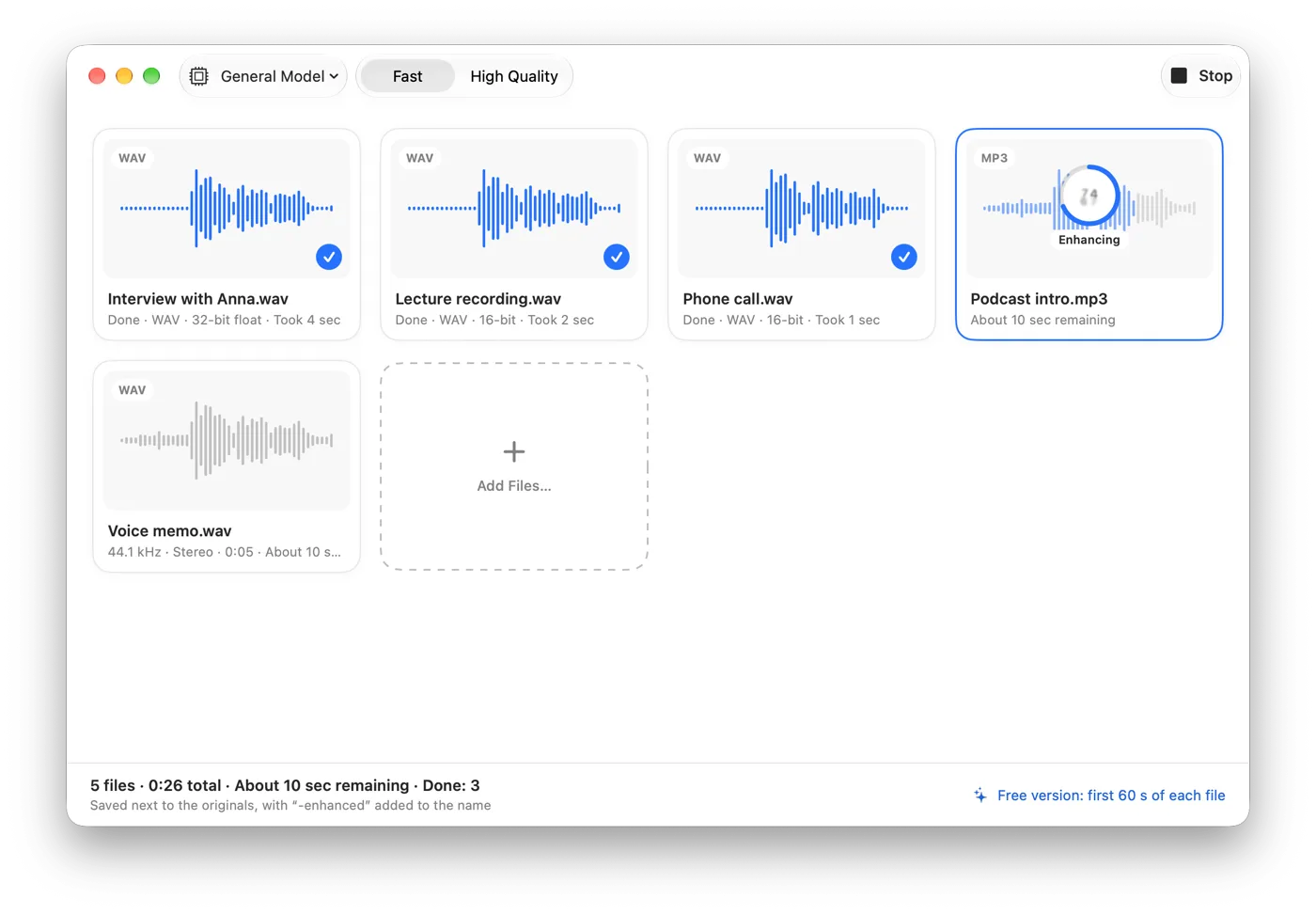
- Batches. Somuno takes many files or whole folders into a queue and saves each result next to its original with “-enhanced” in the name. That suits a season of podcast episodes, a semester of lectures or a set of interviews. See how to clean up a whole folder of recordings at once.
- Files outside an editing project. A podcast, a phone call, a Zoom recording or a voice memo doesn't need a video editor. Somuno opens WAV, AIFF, FLAC, Apple Lossless, MP3 and AAC directly.
- Finished videos. For MP4, MOV and M4V files, Somuno replaces only the soundtrack and copies the picture as is, without re-encoding – handy for a recorded talk or a phone video you don't plan to edit. More in how to clean up the audio in a video without re-exporting it.
- No Final Cut Pro. If you edit in another app or don't edit at all, Final Cut Pro just for voice cleanup costs US$299.99 or a subscription. Somuno is US$19.99 once.
- Damage beyond noise. Somuno's model also handles room reverb, clipping, missing high frequencies, codec artifacts and dropouts. Apple's documentation doesn't describe Voice Isolation as removing reverb or rebuilding missing frequencies.
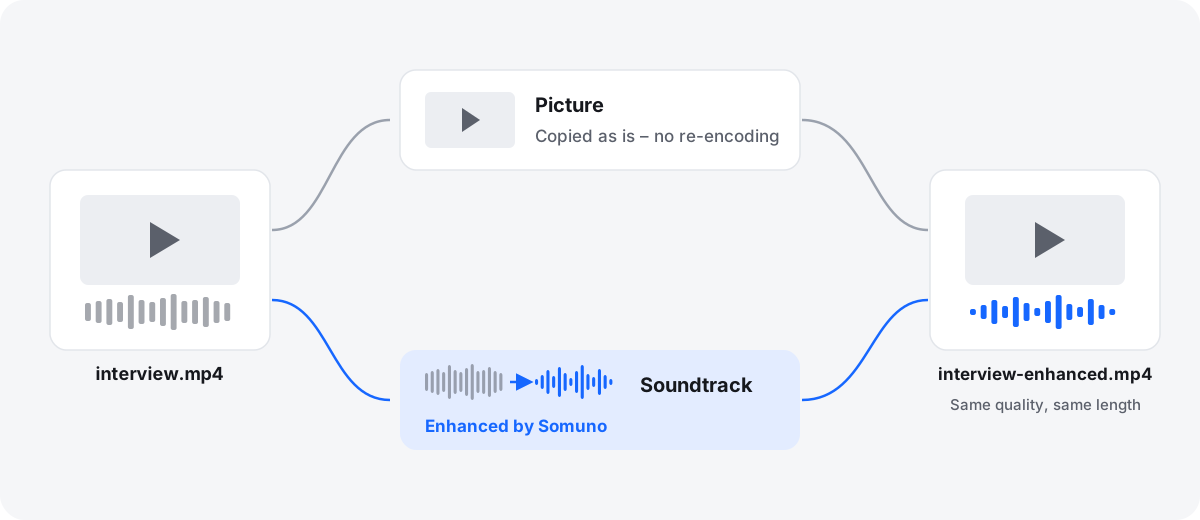
The two also work together. Clean the raw dialogue files in Somuno first, then import the “-enhanced” versions into Final Cut Pro and edit as usual. Do it before you add music: Somuno is made for speech and removes or distorts music and other non-speech sounds.
What does each one fix?
Apple's Final Cut Pro page sums up Voice Isolation as a way to “eliminate background noise and improve clarity of speech”. Around it, Noise Removal has its own Amount slider, and Hum Removal targets 50 or 60 Hz hum. Apple doesn't say whether Voice Isolation reduces room reverb, so if echo is your main problem, test it on your footage. For more on reverb, see how to remove echo and room reverb from a voice recording.
Somuno uses an AI speech-enhancement model that runs on your Mac. One model handles background noise and hum, room reverb and echo, clipping, missing high frequencies, codec artifacts, dropouts from packet loss, and the sound of low-quality microphones. You choose General Model, or Keep Laughter, which removes noise but keeps laughter, and a Strength slider from 0 to 100 % mixes the original back in. There are no per-band controls.
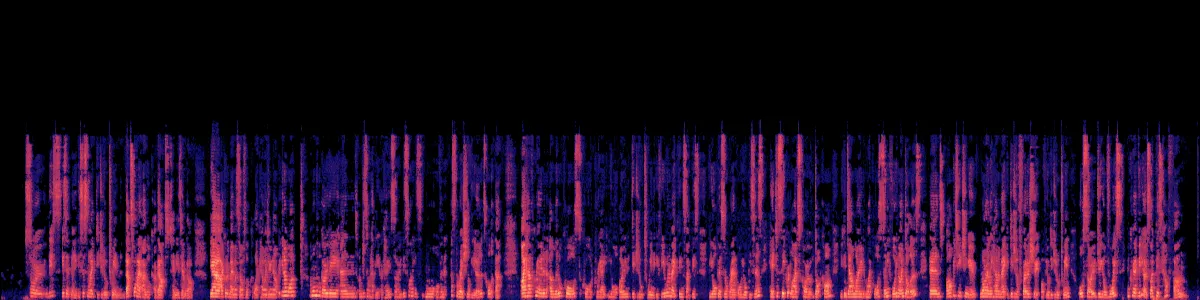
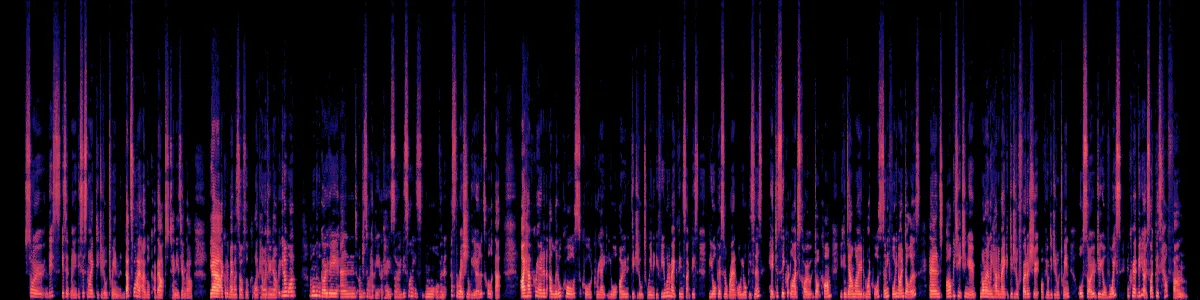
Here is Somuno's output on a phone video with noise all around the speaker, with default settings and both versions at the same loudness. This is Somuno's result only. We haven't processed this clip with Final Cut Pro.
Talking to a phone camera
A phone video with noise all around the speaker.
 OriginalEnhanced
Original
Enhanced by Somuno
In the original, noise sits under and between the words. After Somuno, the gaps between words are dark.
What do they cost?
- Final Cut Pro: US$299.99 one-time on the Mac App Store, or with Apple Creator Studio at US$12.99 a month or US$129 a year (US$2.99 a month or US$29.99 a year for students and educators), as of November 2026. Creator Studio also includes Logic Pro, Pixelmator Pro, Motion, Compressor and MainStage. You can try it free for 30 days, and Apple offers 3 months free with a new Mac or iPad.
- Somuno: US$19.99 one-time on the Somuno website, for up to 3 Macs you own or use, with a 30-day money-back guarantee. In the Mac App Store version, Somuno Pro is an in-app purchase priced by Apple. The free version has every feature but enhances only the first 60 seconds of each file. Somuno is about to launch, so see pricing.
If you're getting Final Cut Pro to edit video anyway, Voice Isolation comes with it. The price only matters if you'd be buying an editor just to clean up voices. And if you have an Intel Mac, Final Cut Pro runs on it and Somuno doesn't.
What about iMovie and Logic Pro?
iMovie is free on the Mac App Store. Apple's iMovie guide describes a “Reduce background noise” option with a slider, where “0% represents no background noise reduction, and 100% represents the maximum reduction”, plus equalizer presets to enhance vocal quality. If you make simple videos in iMovie, try that first. It costs nothing.
Logic Pro is US$199.99 one-time, or part of Apple Creator Studio. In Logic Pro 13.0, Apple renamed Studio Voice to Studio Sound “to match the same feature in other Apple apps”. Apple describes Studio Sound as a Voice Memos feature that reduces room ambience and background noise in recordings made on supported iPhone models, with the option to keep fine-tuning in Logic Pro. If you have Logic Pro through Creator Studio, you have Final Cut Pro too, so Voice Isolation is close at hand.
Which one should you choose?
Choose Final Cut Pro's Voice Isolation if…
- you already edit the video in Final Cut Pro
- you want to adjust the cleanup clip by clip as you edit
- you have an Intel Mac
- you also edit on iPad
- you need a full video editor anyway
Choose Somuno if…
- you have a folder of recordings to clean the same way
- your files aren't part of an editing project: podcasts, interviews, lectures, calls, voice memos
- you want a finished video's soundtrack cleaned with the picture left untouched
- you don't own Final Cut Pro and want a one-time US$19.99 tool
- your recordings have reverb, clipping, missing high frequencies or codec artifacts as well as noise
Bottom line: if Final Cut Pro is already open, Voice Isolation is the shortest path. Somuno is for the recordings that never reach your timeline, for many files at once, and for people who don't use Final Cut Pro.
How to compare them on your own recording
- Pick a clip with the problem you care about. Somuno's free version enhances the first 60 seconds of each file, so use a file whose first minute has the worst noise, or export a one-minute clip of that part.
- In Final Cut Pro, put the clip in a project, turn on Voice Isolation and listen at a few Amount settings.
- In Somuno, process the same file with default settings and use the Compare sheet to switch between original and enhanced.
- Compare at about the same loudness, on headphones. A louder version always seems better.
- Listen to the pauses: is the noise gone, or does it pump between words? Then the consonants: S, T and F should stay crisp, and word endings shouldn't be cut off.
- If a result sounds over-processed, lower the Amount in Final Cut Pro or Strength in Somuno, and listen again.
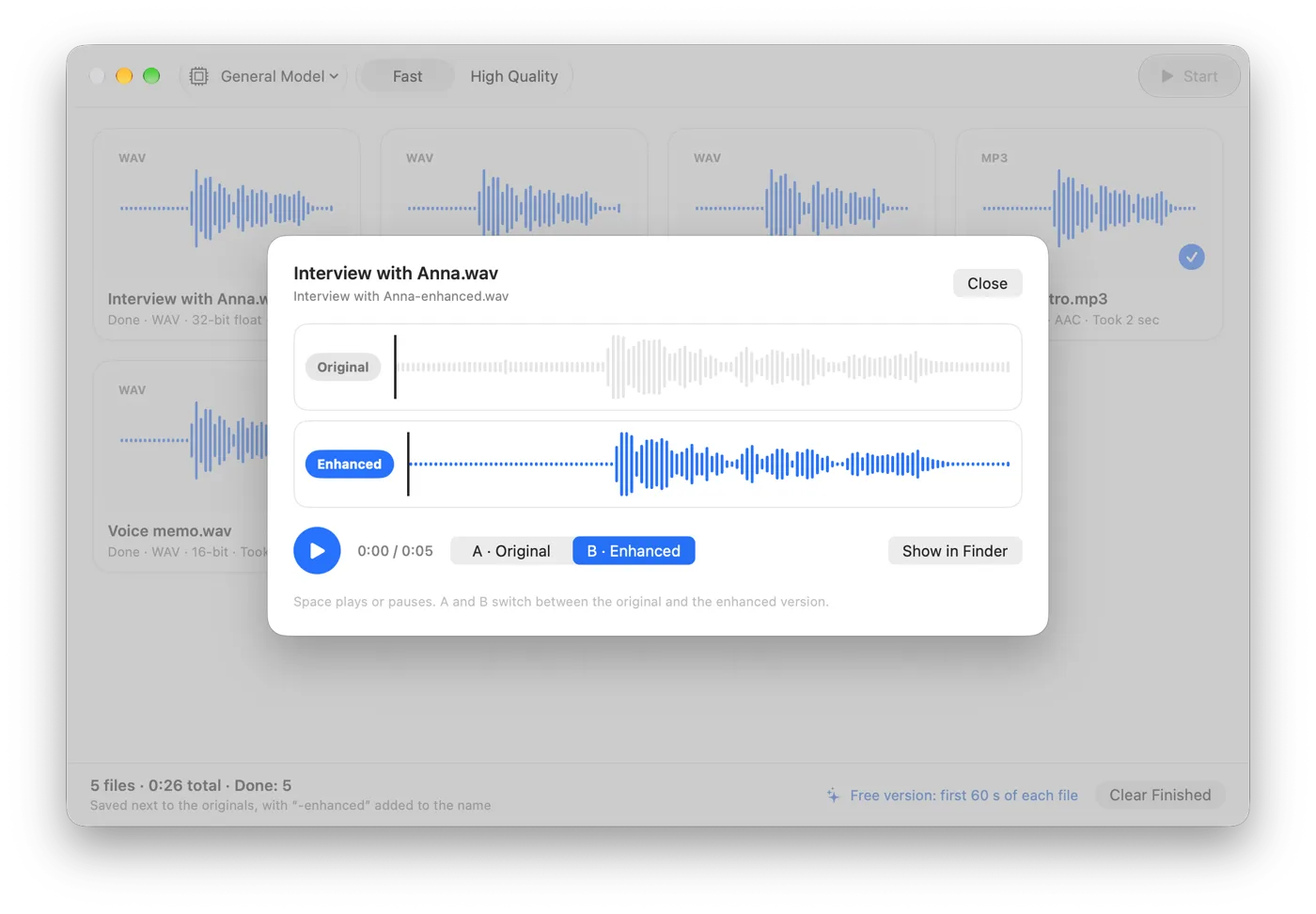
Whatever you use, good sound starts at the shoot: put the microphone close to the speaker, keep noise sources behind it, record a few seconds of room tone at each location, and stop processing as soon as the voice sounds clear. More examples are in the before-and-after samples.
Questions
Is Voice Isolation free in Final Cut Pro?
It isn't sold separately. It's one of Final Cut Pro's built-in audio enhancements, so you need Final Cut Pro itself: US$299.99 one-time, or Apple Creator Studio at US$12.99 a month or US$129 a year, as of November 2026.
Does Voice Isolation remove echo and reverb?
Apple says it prioritizes human voices over the rest of the audio, but doesn't specifically say it removes room reverb. Test it on your own footage. Somuno's model is made to remove room reverb and echo as well as noise.
Can Final Cut Pro clean a whole folder of audio files at once?
Apple's guide describes audio enhancements per clip inside a project. Somuno takes whole folders into a queue and saves each result next to its original.
Can I use Somuno inside Final Cut Pro?
No. Somuno is a standalone app that processes files, not a plugin. Clean the clips in Somuno before you import them, or process a finished MP4, MOV or M4V file and Somuno replaces its soundtrack.
Does iMovie have noise reduction?
Yes. iMovie for Mac has a “Reduce background noise” option with a slider from 0 % to 100 %, plus equalizer presets to enhance vocal quality. iMovie is free on the Mac App Store.