 Somuno
Blog › Comparisons
Somuno vs Adobe Podcast Enhance Speech: on your Mac or in the cloud?
Adobe Podcast Enhance Speech and Somuno do the same basic job: they remove background noise and echo from voice recordings. The difference is where that happens. Enhance Speech is a web app – you upload your file to Adobe, it's processed in the cloud, and you download the result. Somuno is a Mac app that does the cleanup on your own computer, so the recording never leaves it.
Choose Adobe Podcast if you don't have an Apple silicon Mac, or if your files are short and few: the free plan works in Chrome, Safari, Edge or Firefox and handles audio files up to 30 minutes, one at a time, for up to an hour a day. Choose Somuno if your recordings shouldn't be uploaded, if you work offline or with long files, video or whole folders, or if you'd rather pay once – since August 30, 2026, new customers get Enhance Speech's Premium features only with Adobe Firefly Pro, at US$19.99 a month (as of November 2026). We haven't run listening tests of Enhance Speech, so run the same recording through both.
Somuno is made by the author of this blog. Facts about Adobe Podcast and Adobe Premiere come from Adobe's official website, plans and help pages, and from posts by Adobe staff in Adobe's community forums, checked in November 2026. Adobe's plans have changed recently, so check them before you buy.
Somuno and Adobe Podcast at a glance
| Somuno | Adobe Podcast Enhance Speech | |
|---|---|---|
| What it is | Mac app that removes noise and reverb from voices in audio and video files, and repairs damaged recordings | Web app from Adobe that removes noise and echo from voice recordings, part of Adobe Podcast |
| Where audio is processed | On your Mac's GPU. Never uploaded | In Adobe's cloud. You upload each file and download the result |
| Platforms | Mac with Apple silicon (M1 or later), macOS 14 Sonoma or later | Web browser: current Chrome, Safari, Edge or Firefox, on desktop and mobile. No Mac or iPhone app |
| Price (as of November 2026) | US$19.99 one-time on the website, for up to 3 Macs. In-app purchase in the Mac App Store version, priced by Apple. No subscription | Free plan. Premium features only through Adobe Firefly Pro, US$19.99 a month, which also includes 4,000 generative credits a month |
| Free option | Free version with every feature. Enhances the first 60 seconds of each file | Free plan: audio only, one file at a time, up to 30 minutes and 500 MB per file, 1 hour a day, no strength control |
| What it fixes | Background noise and hum, room reverb and echo, clipping, missing high frequencies, codec artifacts, dropouts, low-quality microphones | Noise and echo in voice recordings. Adobe says it also adjusts levels and normalizes the audio. Premium can separate speech, background noise and music |
| Video files | MP4, MOV and M4V: the soundtrack is replaced, the picture is copied without re-encoding | Premium only (MP4, MOV, M4V). The free plan is audio only |
| Batch processing | Yes, in the free version too. Files and whole folders go into a queue | Premium only: bulk upload into an automatic queue. Free: one file at a time |
| Account or internet needed | No account. Works offline | An Adobe account, even for the free plan. Internet needed to upload and download every file |
In the browser or on your Mac: what changes
With Adobe Podcast Enhance Speech, you upload a file, Adobe's servers process it, and you download the cleaned version. Adobe notes that upload and download speed “will depend on your internet connection speed”. Somuno runs an AI speech-enhancement model on your Mac's GPU. Recordings are never uploaded – not to the developer, not to anyone – no account is needed, and it works offline.
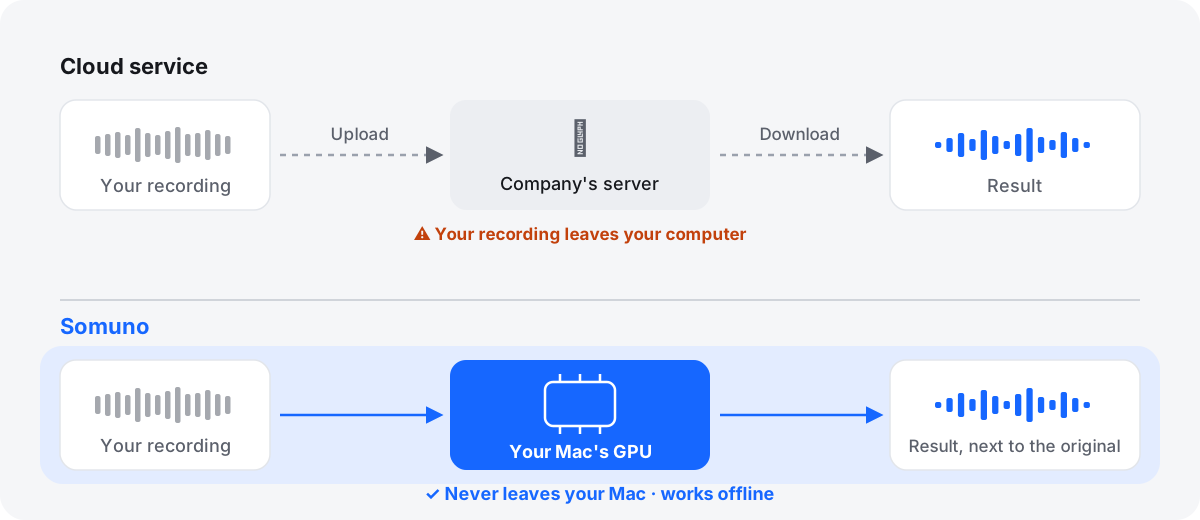
- Privacy. This isn't a judgment of Adobe's security. The question is whether a copy leaves your computer at all. Unreleased episodes, confidential interviews and research or legal audio sometimes can't go to any outside service.
- Your connection. Long WAV files and videos are large. On a slow connection the transfer can take longer than the cleanup, and offline a web tool doesn't work at all.
- Your hardware. Here Adobe wins clearly. Enhance Speech works on any computer with a current browser – Windows, Linux or an Intel Mac – and Adobe lists mobile browsers too. Somuno needs a Mac with Apple silicon and macOS 14 or later.
What Adobe's free plan covers
You need an Adobe account. As of November 2026, Adobe's plans page lists these limits for free Enhance Speech:
- audio only – “no video support”
- “no bulk processing, upload one at a time”
- “no strength adjustment”
- 30 minutes and 500 MB per file, and 1 hour of audio a day
Adobe says it doesn't convert the format, so you get back what you uploaded. For a voice memo or an occasional interview clip, that can finish the job for free. A two-hour lecture has to be split up first, and a day of recordings won't fit in the daily hour.
Somuno's free version works the other way around: every feature – batches, video, all settings – but only the first 60 seconds of each file are enhanced. It's for hearing the result before you buy, not for finishing long files. For short clips, Adobe's free plan does more at no cost.
Adobe Podcast Premium is now part of Firefly Pro
This changed recently. Adobe's help page says: “Starting August 30, 2026, Adobe will no longer be selling Adobe Podcast Premium as a standalone plan to new members.” As of November 2026:
- New customers get the Premium features with Adobe Firefly Pro, shown at US$19.99 a month, billed monthly. It includes 4,000 generative credits a month for Adobe's generative AI tools.
- Existing Podcast Premium subscribers keep their price, and Adobe adds Firefly Standard at no extra cost. If they cancel after August 30, 2026, getting Premium back means buying Firefly Pro.
Premium allows 1 GB and 2 hours per file and 4 hours of enhanced speech a day. It adds video files, bulk upload, and sliders for speech, music and ambience. Since a March 2026 update, it can also download separate stems for speech, background noise and music.
Somuno Pro costs US$19.99 once on the Somuno website, for up to 3 Macs you own or use, with a 30-day money-back guarantee. In the Mac App Store version it's an in-app purchase, priced by Apple. There's no subscription and no daily limit. A year of Firefly Pro at the monthly price shown is about US$240, but it also covers Adobe's generative AI tools, so if you use those, the prices aren't like for like. Somuno is about to launch; see pricing.
What about Enhance Speech in Adobe Premiere?
Adobe Premiere (the new name for Premiere Pro) has its own Enhance Speech in the Essential Sound panel, with a Mix Amount slider. As of November 2026:
- The released app uses the first version of the model, V1. Adobe staff wrote in 2023 that it runs locally and “no internet connection is required”.
- The Premiere Beta 27.0, announced on September 2, 2026, tests Enhance Speech V2. Adobe says it “runs in the cloud as part of Firefly” and uses two generative credits per minute. It's a beta, so this may change.
- The Premiere single-app plan is US$22.99 a month (annual plan, billed monthly), with 25 generative credits a month and a 7-day free trial.
If you already edit in Premiere, try its built-in Enhance Speech first. It may be all you need.
Video files and long batches
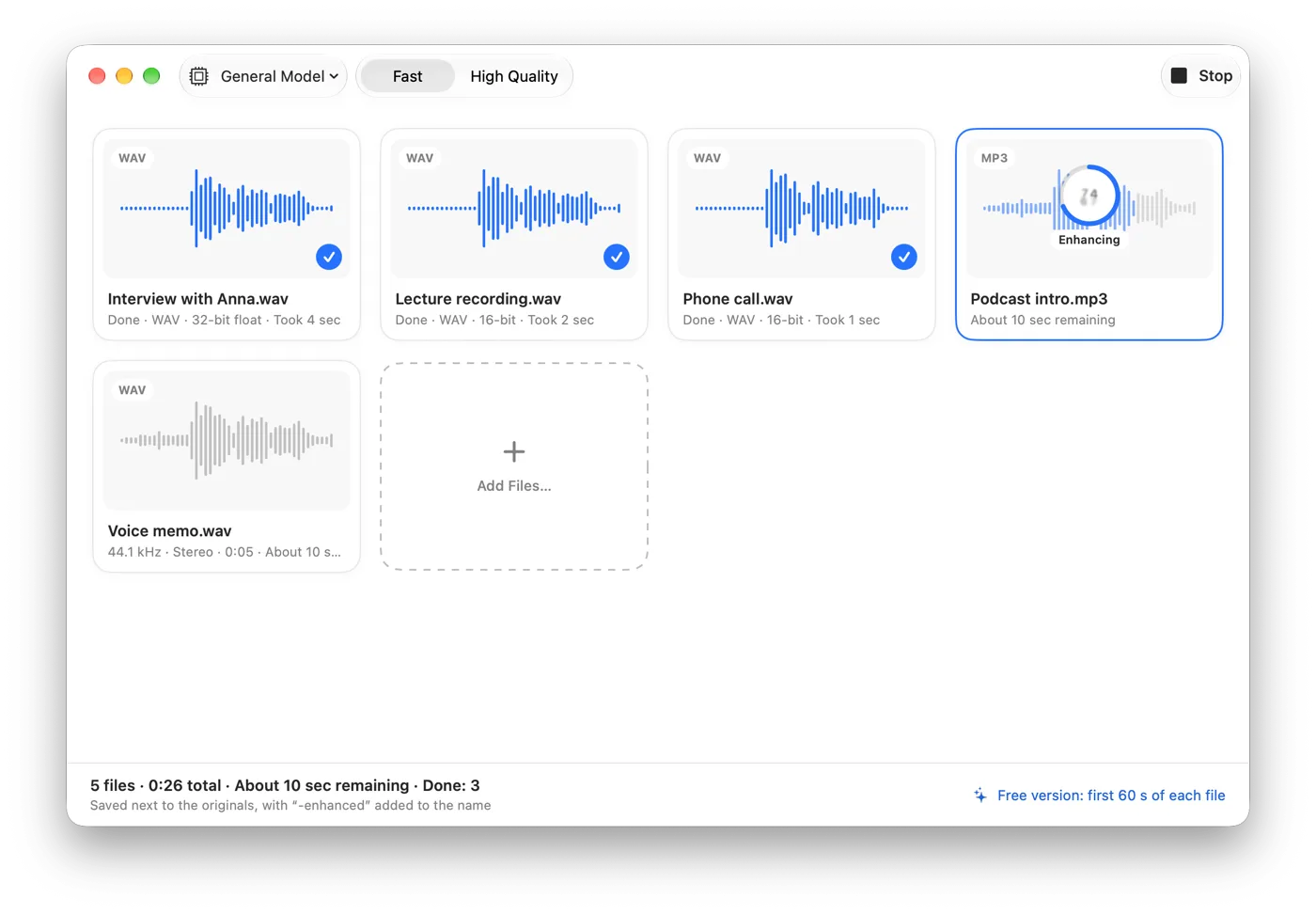
Somuno opens MP4, MOV and M4V files, replaces only the soundtrack and copies the picture without re-encoding – see how to clean up the audio in a video. Batches are in the free version too: add files or whole folders to a queue, and each result is saved next to its original, or in a folder you choose, with “-enhanced” added to the name. With Adobe, video and bulk upload both need Premium.
What each one does to the voice
Adobe's tagline is “Remove noise and echo from voice recordings”. Its FAQ says Enhance Speech “enhances audio by filtering out noise and artifacts, adjusting pitch and volume levels, and normalizing the audio”, and that results “depend on the speaker's audibility and the amount of background noise” – true of every tool here.
Somuno's one model handles background noise and hum, room reverb, clipping, missing high frequencies, codec artifacts, dropouts and low-quality microphones. You choose General Model or Keep Laughter, which removes noise but keeps laughter, and a Strength slider from 0 to 100 % mixes the original back in. Unlike Adobe, Somuno doesn't normalize loudness, and it has no music or ambience sliders.
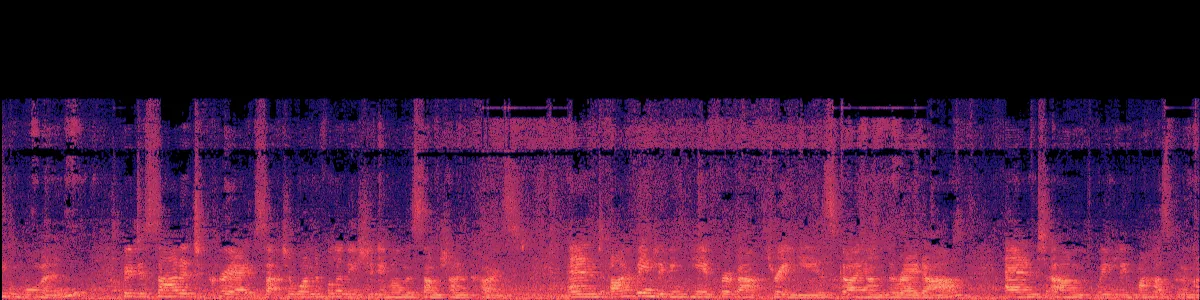
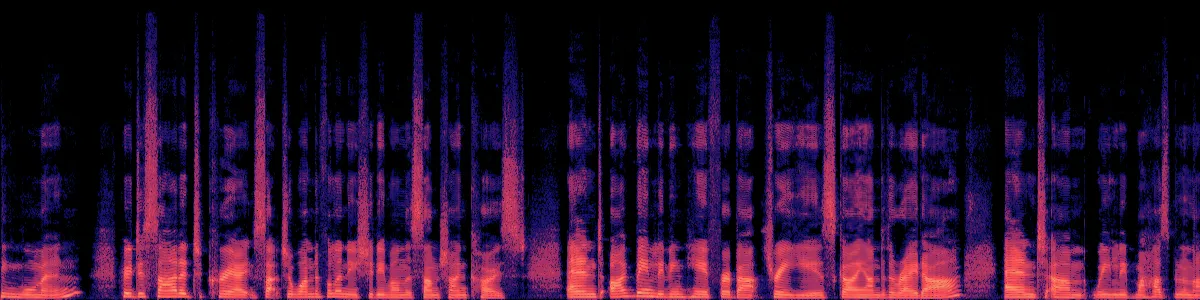
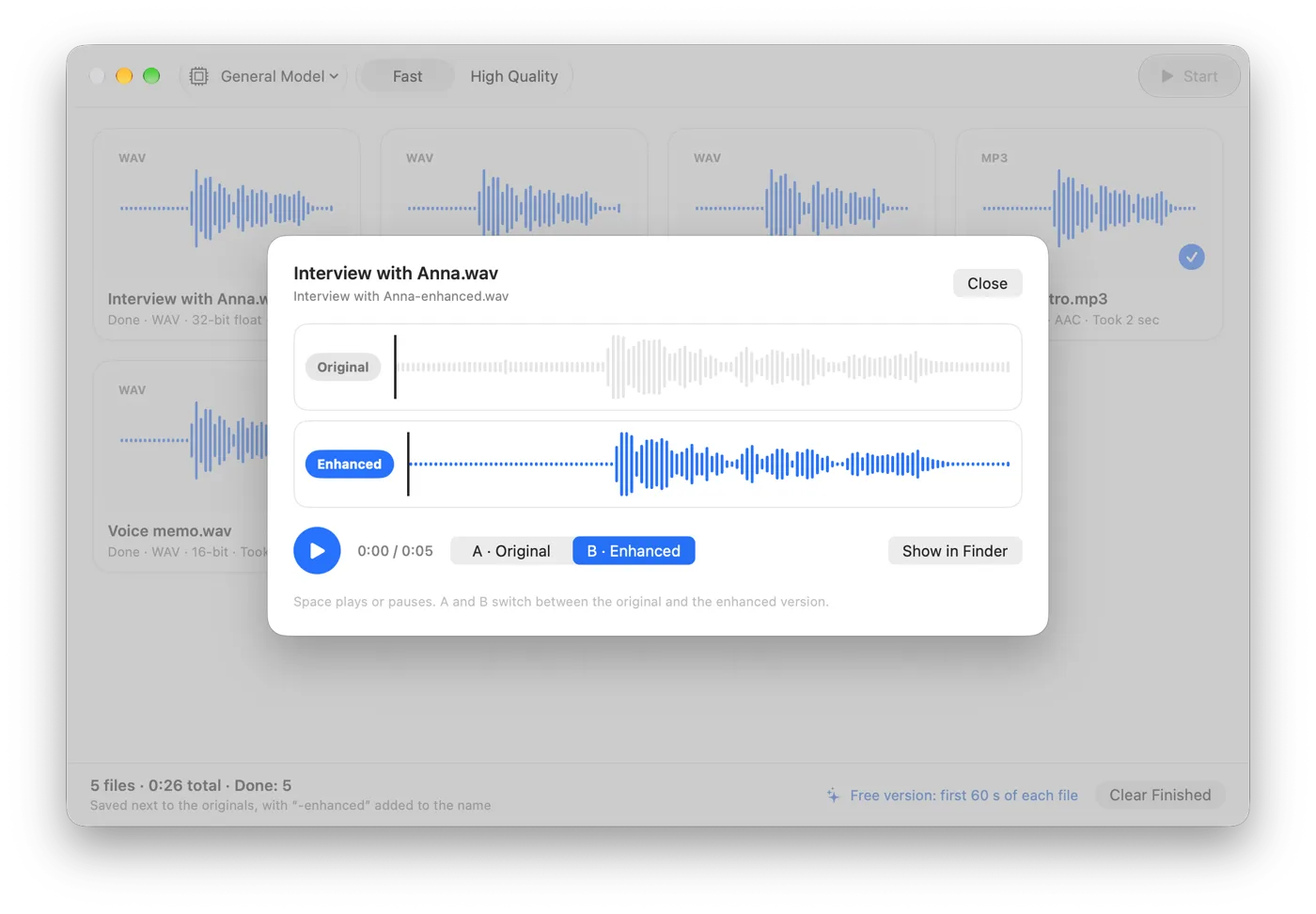
Here is Somuno's output on a talk recorded across a large, echoey room, with default settings, level-matched. This is Somuno's result only. We haven't processed this clip with Adobe Podcast.
Speech in an echoey room
A talk picked up from across a large, reverberant room.
 OriginalEnhanced
Original
Enhanced by Somuno
In the original, each syllable trails into the next over a constant noise floor. After Somuno, the syllables are separate strokes with dark gaps between them. For more, see how to remove echo from a voice recording.
Which one should you choose?
Choose Adobe Podcast if…
- you don't have an Apple silicon Mac, or you work on Windows, Linux or a shared computer
- your files are short audio clips that fit the free plan
- you already pay for Firefly Pro or kept Podcast Premium
- you want speech, music and noise stems, or music and ambience sliders
- you edit in Premiere, where Enhance Speech is built in
Choose Somuno if…
- your recordings shouldn't be uploaded
- you work offline, on a slow connection or with long files
- you clean video files and want the picture left untouched
- you process whole folders without a daily cap
- you'd rather pay once than subscribe
Bottom line: Adobe Podcast Enhance Speech is the easy answer for occasional short clips on any computer, for free. Somuno is for Mac users who want cleanup that stays on their own machine, with video and batches included, for a one-time price.
How to compare them on your own recording
- Export a one-minute audio clip with the noise or echo you care about, as WAV if you can. It fits Somuno's free version and Adobe's free plan.
- Process it in both with default settings.
- Match the loudness before you listen. Adobe normalizes the audio, and louder almost always sounds better at first.
- Listen on headphones. In the pauses, is the noise gone, or does it pump? Do S, T and F stay crisp, and do word endings survive?
- If a result sounds over-processed, lower Strength in Somuno (or Adobe's strength, on Premium) and listen again.
Whatever you use, a better recording beats any cleanup: get closer to the mic, soften the room, record a few seconds of room tone and keep lossless files. More options are in Adobe Podcast alternatives, and more examples in the before-and-after samples.
Questions
Is Adobe Podcast Enhance Speech free?
Yes, with limits. As of November 2026, the free plan needs an Adobe account and takes audio only, one file at a time, up to 30 minutes and 500 MB per file and 1 hour a day. Video, bulk upload and higher limits need Premium, which new customers get through Firefly Pro.
Can I still buy Adobe Podcast Premium on its own?
Not as a new customer. Adobe stopped selling it as a standalone plan to new members on August 30, 2026. Existing subscribers keep their plan and price.
Does Adobe Podcast work offline?
No. Enhance Speech processes files in Adobe's cloud. Somuno processes files on your Mac and works offline. In Adobe Premiere, the released Enhance Speech (V1) runs locally, while V2 in the beta runs in the cloud.
Can I use Somuno on Windows or in a browser?
No. Somuno needs a Mac with Apple silicon (M1 or later) and macOS 14 Sonoma or later. Without one, Adobe's browser tool is the practical choice.
Does Somuno sound better than Adobe Enhance Speech?
We haven't run listening tests of Enhance Speech, so we can't say, and it depends on the recording. Run the same clip through both, match the loudness and listen on headphones.