 Somuno
Blog › Comparisons
Somuno vs Auphonic: on-device cleanup or cloud post-production?
Auphonic and Somuno overlap on one job – removing background noise and reverb from voices – but they are different kinds of tools. Auphonic is a cloud post-production service: you upload a recording, and its servers can level it, normalize its loudness, reduce noise and reverb, cut filler words, transcribe it and help you publish it. Somuno is a Mac app that does one of those jobs, cleaning up the voice, entirely on your own computer, for a one-time price.
Choose Auphonic if you publish podcasts and want the whole post-production chain in one pass, if you don't have an Apple silicon Mac, or if you want an API for automation. Choose Somuno if your recordings shouldn't leave your computer, if you work offline or with large files, or if you'd rather pay once than buy hours of processing. We haven't run listening tests of Auphonic, so try both on the same recording – each has a free option.
Somuno is made by the author of this blog. Facts about Auphonic come from its official website and help pages, checked in November 2026. Prices change, so check them before you buy.
Somuno and Auphonic at a glance
| Somuno | Auphonic | |
|---|---|---|
| What it is | Mac app that removes noise and reverb from voices in audio and video, and repairs damaged recordings | Web-based audio post-production: leveling, loudness, noise and reverb reduction, transcripts, publishing and more |
| Where audio is processed | On your Mac's GPU. Never uploaded | On Auphonic's servers. You upload files or links |
| Platforms | Mac with Apple silicon (M1 or later), macOS 14 Sonoma or later | Web browser, plus an API and a command-line tool (CLI) |
| Price (as of November 2026) | US$19.99 one-time on the website, for up to 3 Macs. In-app purchase on the Mac App Store, priced by Apple | 9 hours a month from US$11 a month billed yearly (US$13 monthly), or one-time credits from US$12 for 5 hours. List prices shown on the official site, excluding VAT |
| Free option | Free version with every feature. Enhances the first 60 seconds of each file | 2 hours of audio per month. Free productions include an Auphonic jingle |
| What it fixes | Background noise and hum, room reverb and echo, clipping, missing high frequencies, codec artifacts, dropouts, low-quality microphones | Noise and reverb, hum, breaths and mouth noises, missing high frequencies, clipping and codec artifacts |
| Video files | MP4, MOV and M4V: the soundtrack is replaced, the picture is copied without re-encoding | Accepts video such as MP4, MOV and MKV, and processes the audio track only |
| Batch processing | Yes, in the free version too. Files and whole folders go into a queue | Batch productions and watch folders on paid plans, not on Free |
| Account or internet needed | No account. Works offline | Internet needed to upload every file. Usage is counted against credits |
Cloud or on your Mac: what changes
With Auphonic, you upload a file or a link, and processing happens on Auphonic's servers. Somuno runs on your Mac's GPU: recordings are never uploaded, no account is needed, and it works offline.
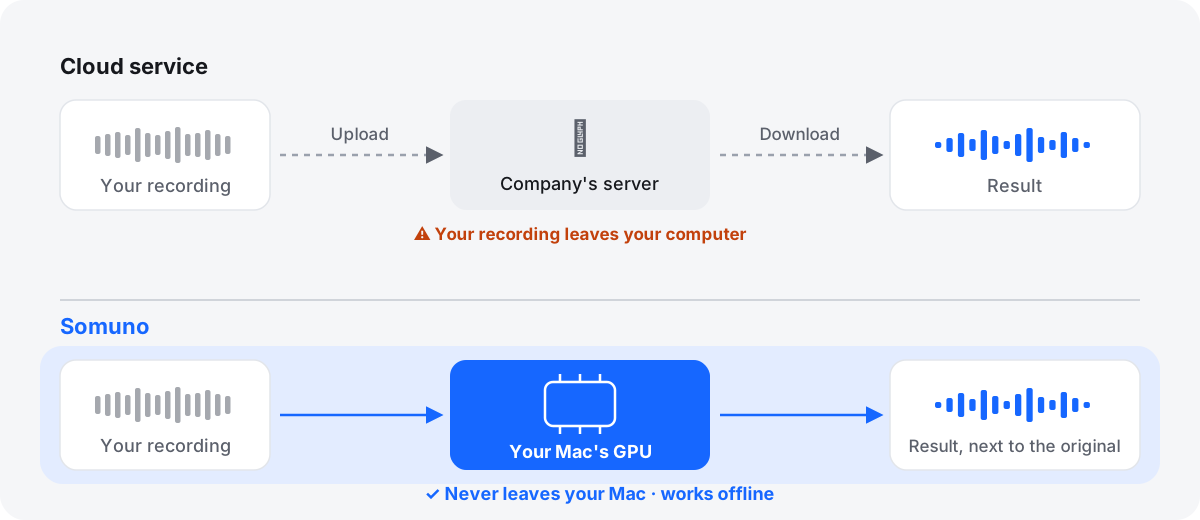
That difference shows up in three places:
- Privacy. This isn't a judgment of Auphonic's security, just whether a copy leaves your computer at all. For unreleased episodes, confidential interviews, research or legal audio, some people can't upload files to an outside service.
- Your connection. Long WAV files and videos are large, and on a slow connection the upload can take longer than the cleanup.
- Your hardware. Here the cloud wins. Auphonic works from any computer with a web browser. Somuno needs a Mac with Apple silicon and macOS 14 or later, and its speed depends on that Mac.
Auphonic does much more than noise reduction
Comparing Auphonic with Somuno on noise alone undersells it. Its official pages describe a full post-production chain:
- leveling and loudness normalization, so episodes sound even and meet a loudness target
- several noise and reverb reduction modes, from Dynamic Denoiser to Speech Isolation
- removal of breaths, mouth noises and hum
- bandwidth extension, which “artificially recreates higher audio frequencies”, and repair of clipping and codec artifacts
- cutting filler words and silences, transcription and, on paid plans, automatic show notes
- multitrack productions, publishing, an API, a CLI and watch folders
Somuno does one job: it cleans up the voice. It doesn't level or normalize loudness, cut filler words, transcribe or publish. If you want all of that from one upload, Auphonic is built for it.
What each one does to the voice
On cleanup itself, the lists overlap: both address noise, reverb, hum, clipping, missing high frequencies and codec artifacts. Auphonic also lists breaths and mouth noises; Somuno also lists dropouts and low-quality microphones.
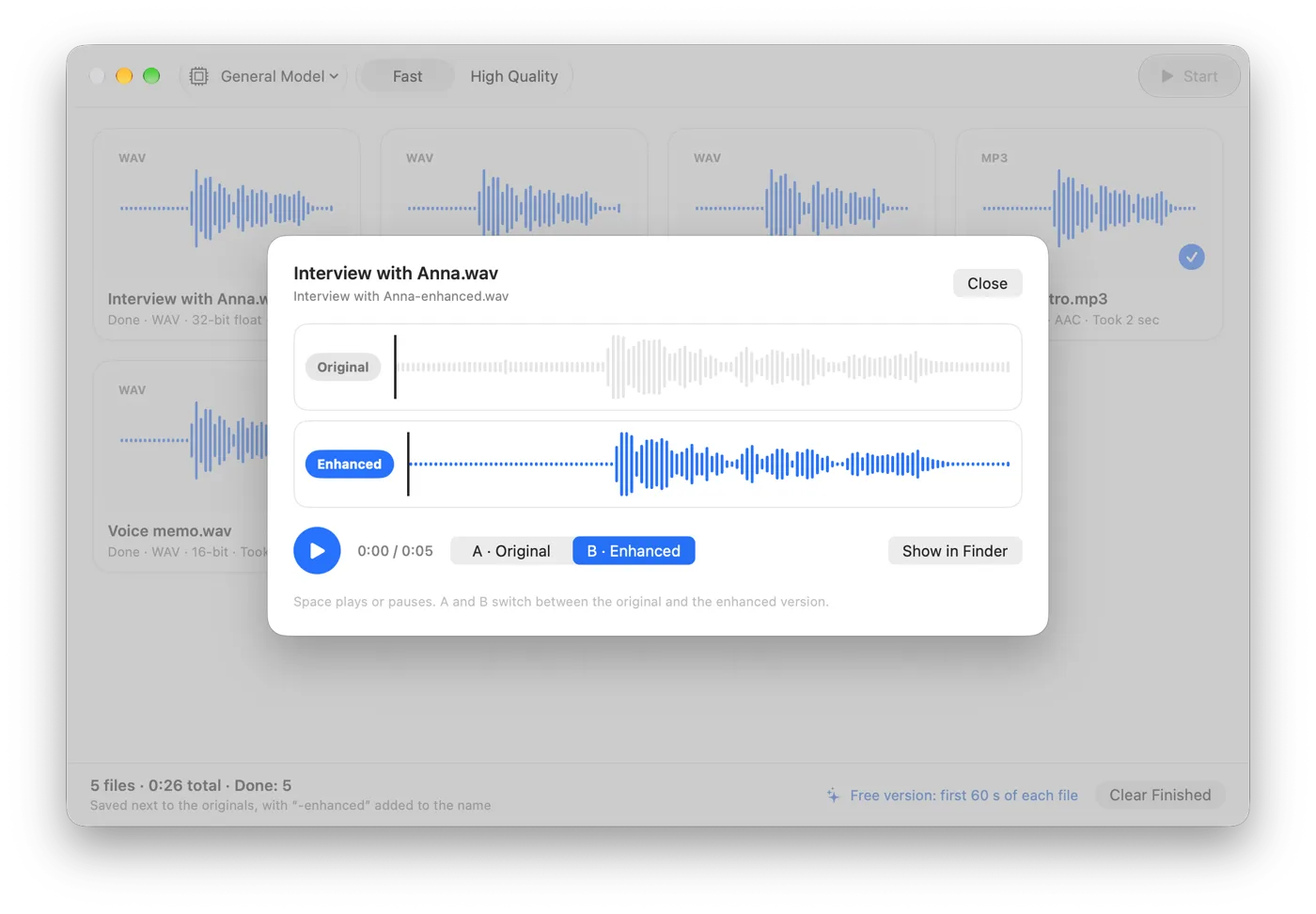
Somuno uses an AI speech-enhancement model that runs on your Mac and handles all of these in one pass. You choose General Model or Keep Laughter, which keeps laughter, and a 0–100 % Strength slider mixes the original back in. There are no per-band controls or spectral editing. Somuno is made for speech: it removes or distorts music, so clean the voice before you add a music bed. Very damaged audio can come out with artifacts, so try the free version first.
Here is Somuno's output on a podcast voice under steady background noise, with default settings and both versions level-matched. This is Somuno's result only, not Auphonic's.
Podcast with background noise
A podcast voice buried in steady background noise.
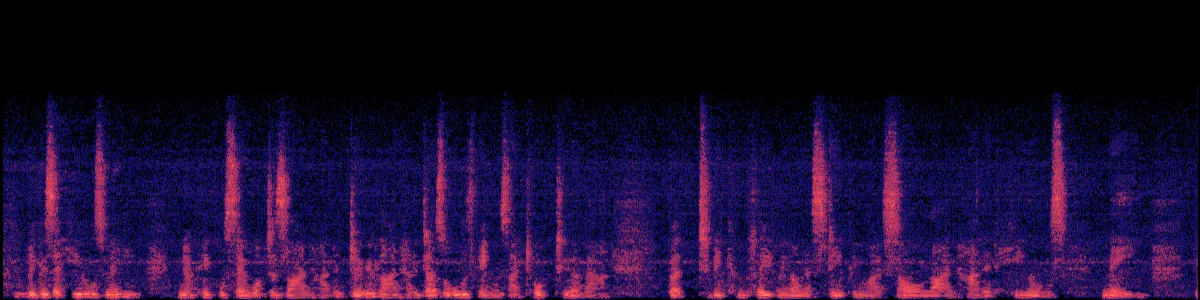
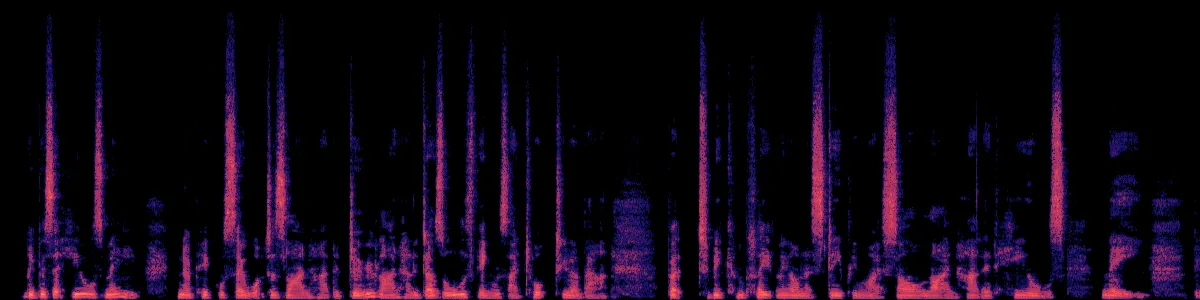 OriginalEnhanced
Original
Enhanced by Somuno
In the original, a haze of noise fills every gap between words, and there's nothing above about 16 kHz. After Somuno, the gaps are dark and the top band is filled in. For the general method, see how to remove background noise from audio on Mac.
Price: credits and subscriptions or a one-time purchase
Auphonic charges by the hour of audio. These are the list prices shown on its official site as of November 2026, excluding VAT:
- Free: “Auphonic is free for 2 hours of processed audio per month.” Free productions include an Auphonic jingle, and unused free hours don't carry over.
- Monthly plans: from US$13 a month for 9 hours, or US$11 a month billed yearly, up to US$290 a month for 250 hours (US$245 billed yearly). These credits reset every month.
- One-time credits that never expire: US$12 for 5 hours, US$23 for 10 hours, US$55 for 25 hours, and larger packs.
- Billing rule: usage is counted by the length of the input file, with a minimum of 3 minutes per production.
Somuno costs US$19.99 once on its website, for up to 3 Macs you own or use, with a 30-day money-back guarantee, or an in-app purchase on the Mac App Store, priced by Apple. There's no subscription and no hourly meter. The free version has every feature but enhances only the first 60 seconds of each file. Somuno is about to launch – see pricing.
Which costs less depends on volume. For a few hours a year, Auphonic's free plan or a small credit pack can cost less than Somuno. For regular use, a one-time purchase usually costs less: the smallest Auphonic plan billed yearly comes to US$132 a year. But that plan also buys leveling, loudness, transcripts and publishing.
Video files and batches
Auphonic accepts many audio and video formats, including MP3, WAV, FLAC, MP4, MOV and MKV. For video, its help pages say “we process the audio track only”. Batch productions and watch folders are on paid plans.
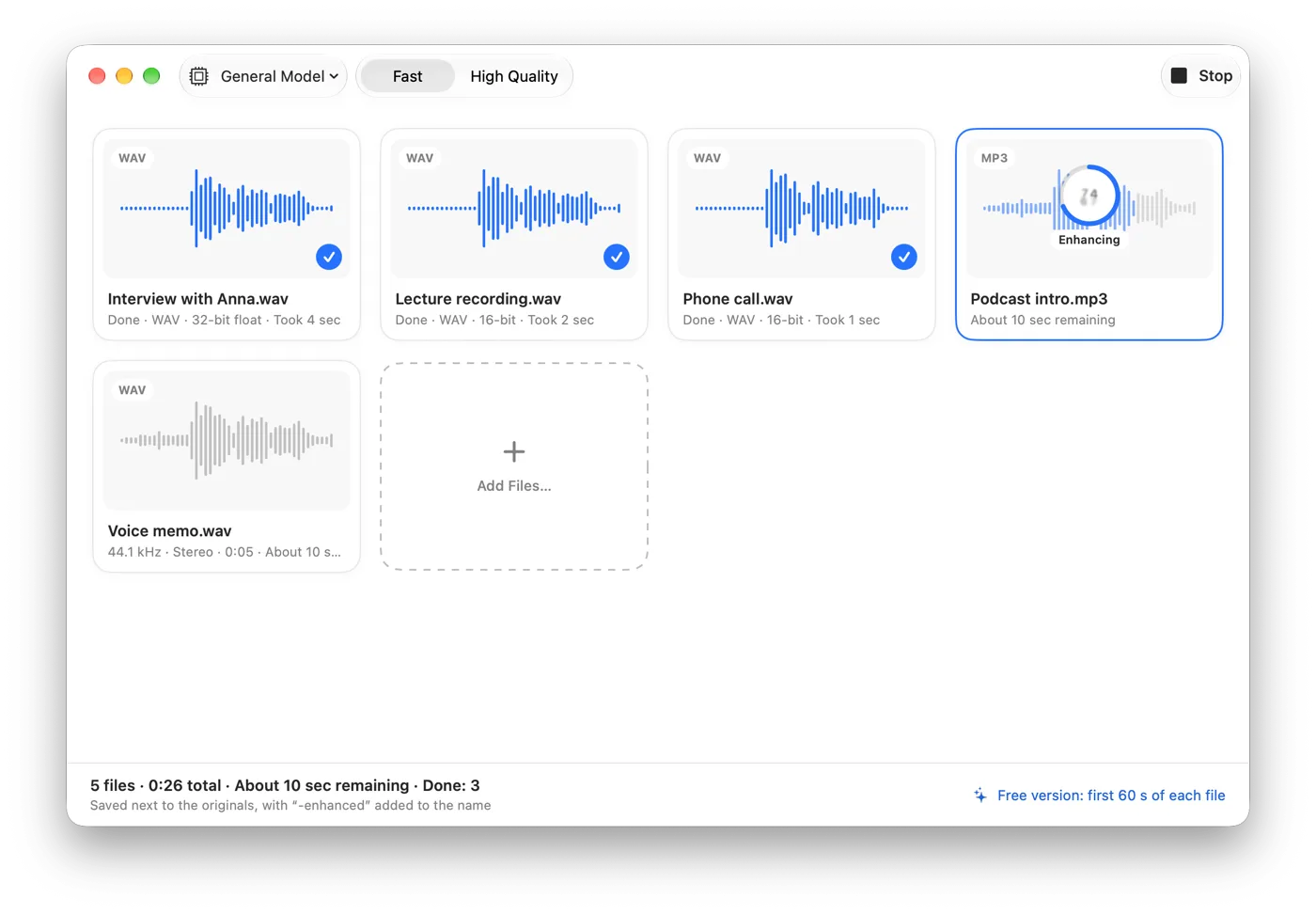
Somuno opens WAV, AIFF, FLAC, Apple Lossless, MP3 and AAC, plus MP4, MOV and M4V videos, where it replaces only the soundtrack and copies the picture without re-encoding – see how to clean up the audio in a video. Batches work in the free version too: add files or whole folders to a queue, and each result is saved next to its original with “-enhanced” added to the name.
Which one should you choose?
Choose Auphonic if…
- you publish a podcast and want leveling, loudness, cleanup, transcripts and publishing from one upload
- you don't have an Apple silicon Mac
- you want to automate with an API, a CLI or watch folders
- you produce multitrack episodes
- you process a couple of hours a month and the free plan, jingle included, works for you
Choose Somuno if…
- your recordings shouldn't leave your computer
- you work offline, on a slow connection or with large files
- you'd rather pay once than buy hours of processing
- you need the voice cleaned and handle levels in your editor
- you clean the sound of videos and want the picture untouched
Bottom line: Auphonic is a post-production pipeline in the cloud, and noise reduction is one step of it. Somuno is a local tool for that one step. If you want the whole pipeline and uploading is fine, pick Auphonic. If you want cleanup that stays on your Mac, for a one-time price, pick Somuno.
How to compare them on your own recording
- Pick one recording with the noise or echo you care about. Somuno's free version enhances the first 60 seconds, so export the worst part as a one-minute WAV. Auphonic counts at least 3 minutes per production.
- Process the same file in both, with default settings first.
- Match the loudness before you listen. If leveling or loudness normalization is on in your Auphonic production, its result may simply be louder, and louder always seems better.
- On headphones, listen to the pauses: is the noise gone, or does it pump between words? Then to consonants: S, T and F should stay crisp.
- If a result sounds over-processed, lower Strength in Somuno or try another denoiser mode in Auphonic.
Either way, a better recording beats any cleanup: get closer to the mic, soften the room, keep some room tone, use lossless files and don't stack noise reducers. Hear more in the before-and-after samples, or for another local Mac app, see Somuno vs Hush.
Questions
Does Auphonic work offline?
No. Auphonic processes audio on its servers, so every file is uploaded. Somuno processes files on your Mac and works offline.
Can Somuno level audio or normalize loudness like Auphonic?
No. Somuno removes noise and reverb and repairs damaged voices. It doesn't level, normalize loudness, cut filler words, transcribe or publish.
Which is cheaper, Auphonic or Somuno?
It depends on volume. As of November 2026, Auphonic is free for 2 hours a month and paid plans start at US$11 a month billed yearly. Somuno Pro is US$19.99 once on the website. For occasional use Auphonic can cost less; for regular use a one-time purchase usually does.
Does Somuno sound better than Auphonic?
We haven't run listening tests of Auphonic, so we can't say, and it depends on the recording. Try both on the same file, matched in loudness, on headphones.